Photoshop/Illustrator/PaintShopPro Support - Help, Tutorials, Setting etc

  • Thread starter Thread starter PseudoKiller
  • Start date Start date
Thanks PK. I thought about that before, Ill give it a try tomorrow. 🙂
 
jan said:
Thanks PK. I thought about that before, Ill give it a try tomorrow. 🙂

Ooo, that works very nicely. Thanks PK. 🙂

Made this ...
 

Attachments

  • weeeee.gif
    weeeee.gif
    20.6 KB · Views: 152
Photoshop CS Question...

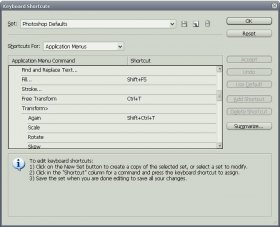
i can't even use the DELETE button! Ctrl+T does f**k-all aswell...

the shortcuts are all their though? am i missing something? anyone got the same problem?

trying to finish off a graphics project for tomorrow afternoon and this is really annoying me have to click through the menu to free transform 😡
 

Attachments

  • hmmm.jpg
    hmmm.jpg
    54.8 KB · Views: 133
Do you have Photoshop CS? If you are using a warezed copy, then know that the keyboard shortcuts for that are disabled.
 
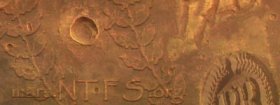
I want to take my avitar (specifically the white part of it), and put this into another image and "sink" it into it like a crater?

Although i dont have a scooby doo how to do it.

Any ideas?
 
Forget it - sorted - took me a few hours or tampering but i have what I want.

Looks forward to Feb...
 
I guess it must be very secret stuff. Or can you share with us how you did it.
 
Hehe,
Sorry guys, what i did was a little different from what i wanted, as you can see from my new sig ,(couldn’t wait until February and the landings are happening now anyhoo), that its not cratered or sunk in, but i used lighting effects to make it look a little deep (with my avatar), and then with the leaves i used the layer blending options and basically fiddled with them until it looked about right.

Here is the .psd if you want to disassemble it... (697k).

So i suppose if anyone could let me know how i would make it appear more "sunk" in i would appreciate it. Muck around with the sig if you want.
 
Im not too good at this stuff yet. Is this any better?
 

Attachments

  • marssig1.jpg
    marssig1.jpg
    38.3 KB · Views: 148
You used a hard chisel on that one yeah?

The thing is that thats still makes it look like its raised as opposed to lowered.

I'm looking for a sort of a hot wax effect, like you used to get on the back of letter when they used wax and a stamp to seal it. Where the stamp, my logo, would be pushed into the picture.

Hell, i dont even know if its possible.

Thanks tho jan.

How do you animate your sig BTW?
 
Actually I used a soft chisel and changed the lighting a little an a couple other little things. You can see in the psd Im attachin.

I use a few diff anim progs, IR, AS and PI, but wadada made this one for me! 🙂
 

Attachments

TheBlueRaja said:
😀

Whats IR, AS and PI?

I have photoshop and thats it.

ImageReady(comes w/PS), AnimationShop(comes w/PSP) and PhotoImpact.
 
I wonder why my brushes options are all greyed out when I open the brushes pallette?
 

Members online

No members online now.

Forum statistics

Threads
62,021
Messages
673,242
Members
5,639
Latest member
Everlong
Back
Top