NvNews + OSNN + SP Folding Team

Status
Not open for further replies.
Re: Folding@home Team page created.

Steevo said:
Run it as a service.

How would I do that? I peeked around in the configuration options and didn't see it.
 
Re: Folding@home Team page created.

Nope kcny - Anonymous is where all the points go from people that nevcer register any user or team! Hardly surprising that is the number one!

I do believe you were serious as well 😛.... good for a laugh anyway!....

Oh and you get the option to run as service when you go through the config checks - it asks you whether to enable or disable that - the question is pretty clear (to me anyway)
 
Re: Folding@home Team page created.

Mainframeguy said:
Nope kcny - Anonymous is where all the points go from people that nevcer register any user or team! Hardly surprising that is the number one!

I do believe you were serious as well 😛.... good for a laugh anyway!....

Oh and you get the option to run as service when you go through the config checks - it asks you whether to enable or disable that - the question is pretty clear (to me anyway)

Nothing is clear to me, too many 0's and 1's in my head 🙂

If it is installed already, where do I find it? Please lead the blind
 
Re: Folding@home Team page created.

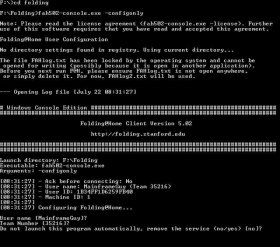
as far as running it as a service, i found to go to a CMD prompt, and type with the switch of -configonly to get the proper menus. But I don't get the menus that were referenced. Can someone explain how to do it? Sorry, I can't do it on my own 🙁
 
Re: Folding@home Team page created.

It's ON!!!
 

Attachments

  • dsl.JPG
    dsl.JPG
    131.5 KB · Views: 138
Re: Folding@home Team page created.

kcnychief said:
as far as running it as a service, i found to go to a CMD prompt, and type with the switch of -configonly to get the proper menus. But I don't get the menus that were referenced. Can someone explain how to do it? Sorry, I can't do it on my own 🙁

OK KC - see the attached screenie? Now that is the relevant question when you run it with configonly switch., OK? If it comes up that way then you ALREADY have it running as a service (like I do)! OK? So the question will be at the same sequence in the configuration, but phrased for opting to run it as a service, to which I believe you reply yes....

One last thing, after that you'll need to reboot your machine to have it run as a service of course, maybe that's the bit that is confusing you? Post back if any problems - and congrats on your 10k BTW, I can see at your rate you'll soon be taking my slot, good for you, could do with some committed people that spread the folding around a few rigs too.... (and service running is DEFINITELY the WTG on other rigs, makes it sooo invisible!)
 

Attachments

  • foldingconf.jpg
    foldingconf.jpg
    52.5 KB · Views: 139
Re: Folding@home Team page created.

Mainframeguy said:
OK KC - see the attached screenie? Now that is the relevant question when you run it with configonly switch., OK? If it comes up that way then you ALREADY have it running as a service (like I do)! OK? So the question will be at the same sequence in the configuration, but phrased for opting to run it as a service, to which I believe you reply yes....

One last thing, after that you'll need to reboot your machine to have it run as a service of course, maybe that's the bit that is confusing you? Post back if any problems - and congrats on your 10k BTW, I can see at your rate you'll soon be taking my slot, good for you, could do with some committed people that spread the folding around a few rigs too.... (and service running is DEFINITELY the WTG on other rigs, makes it sooo invisible!)

Thanks for the info, I figured it out last night. The problem I had was actually that I downloaded the wrong client. On the F@H page I had been downloading the very top client, which didn't have that option. So, I'm all set now, thanks 🙂
 
Re: Folding@home Team page created.

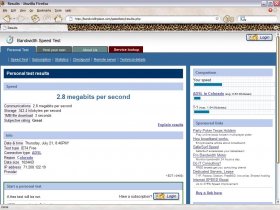
Next question, how would this look from an Admin's standpoint? Would they notice an increase in upstream, or is it just on the local PC resources?
 
Re: Folding@home Team page created.

I am officially in 14th place. Next person will take awhile b/c they are like double my score......ahhh the dreams.
 
Re: Folding@home Team page created.

I dont kno if its just me but does anyone notice the F@H client interfering with firefox. It slows down most dialog boxes. When I exit F@H it returns to normal. This has happened on my server and another desktop.

I do use the graphical icon because I like the icon in the tray.

Any suggestions?
 
Re: Folding@home Team page created.

Admiral Michael said:
I dont kno if its just me but does anyone notice the F@H client interfering with firefox. It slows down most dialog boxes. When I exit F@H it returns to normal. This has happened on my server and another desktop.

I do use the graphical icon because I like the icon in the tray.

Any suggestions?

I don't really think it's the application interfering persay, I think it's just because it sucks CPU cycles. But, I'm no F@H expert. What is your CPU usage set to? Default is 100%
 
Re: Folding@home Team page created.

As I said before, I'm no expert.

Have you tried accessing the same pages within IE with F@H running? My assumption would still be the CPU usage....but that's just me.

Only reason why I can't think of another cause is because it doesn't do anything. It doesn't pop-up, unless you click it, it just sits there. I dunno, maybe turn it down?

Your system seems powerful enough to run it (I reviewed your specs), and I want to avoid the whole IE vs Firefox debate.

Besides CPU usage, I have nothing else to give, I'm so ashamed :dead:
 
Re: Folding@home Team page created.

Priority.


And Firefox has issues (it seems to me) with flash and other crap. I still use it and like it though.


I assume you aer talking about the slow down when visiting sites like heavy.com and the like.
 
Re: Folding@home Team page created.

kcnychief said:
Next question, how would this look from an Admin's standpoint? Would they notice an increase in upstream, or is it just on the local PC resources?
I believe the only time a net connection is used by the F@H client is to send results and download the next work unit. Both of which should use hardly any bandwidth at all. Having a 4Mb/s connection really gives no real advantage over someone on 56k. 🙂
 
Re: Folding@home Team page created.

zeke_mo said:
After 4 days of not folding im back on track 🙂. I have to defend my position from kcnychief 😉

Do you hear the pitter patter of my feet yet son? Muhahahaha *evil laugh*
 
Re: Folding@home Team page created.

Steevo said:
Priority.


And Firefox has issues (it seems to me) with flash and other crap. I still use it and like it though.


I assume you aer talking about the slow down when visiting sites like heavy.com and the like.
nope, just opeing the preferences or waiting for the OK button to become enabled when trying to download something.
 
Status
Not open for further replies.

Members online

No members online now.

Forum statistics

Threads
62,021
Messages
673,242
Members
5,642
Latest member
osipov
Back
Top