How to remove "local disk" in win 7 explorer

See if those drives are listed in system protection and if protection is turned on for them and/or if they say missing.

If protection is on and/or they are missing turn protection off for the drives and they should then disappear.

How can I see if the drives are in system protection? And they are not listed in the result of bcdedit /enum all....😡
 
Start > right-click Computer > properties

System protection will be on the left side.
 
Start > right-click Computer > properties

System protection will be on the left side.

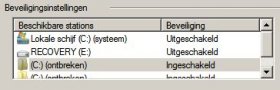
Found it; There are 3 "C disks", one system disk (where I have installed windows) and two other with the comments: (c) "Fail" (lack?) and "enabled"

I cannot remove these last two.

See attachment
 

Attachments

  • sysbev.JPG
    sysbev.JPG
    19.1 KB · Views: 329
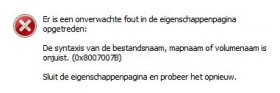
and when I try to remove the systemprotection for these last two I get this:

An unexpexted failure in the propertiespage has occurred
The syntaxis of the filename, mapname of volumename is wrong (0x8007007b)
close the propertiespage and try again

when I hit cancel, the drives are gone, but then I opened explorer and L and U are still there. Will reboot now, maybe this will fix it...
 

Attachments

  • sysbevfoutmelding.JPG
    sysbevfoutmelding.JPG
    17.8 KB · Views: 252
Highlight the entry and then click on the configure button.

On the next screen turn off system protection for that disk then try to delete the entry.
 
Highlight the entry and then click on the configure button.

On the next screen turn off system protection for that disk then try to delete the entry.

turned system protection off, items are deleted, but disks are still there in explorer...
 
the solution was actually quite simpel 😱
Both disks showed up in the registry in
hklm\system\controlset(and controlset001 and controlset002)\control\sessionmanager\dos devices
removed both entries, disks are gone!

Thanks for all the suggestions anyway!
 
the solution was actually quite simpel 😱
Both disks showed up in the registry in
hklm\system\controlset(and controlset001 and controlset002)\control\sessionmanager\dos devices
removed both entries, disks are gone!

Thanks for all the suggestions anyway!

haha I had a feeling it was just a registry issue since the disc were never physically there but I did pick up some tips. Good for you.
 

Members online

No members online now.

Forum statistics

Threads
62,021
Messages
673,242
Members
5,642
Latest member
osipov
Back
Top