Sidebar Opacity

ming

OSNN Advanced
Joined
17 Jun 2003
Messages
4,252
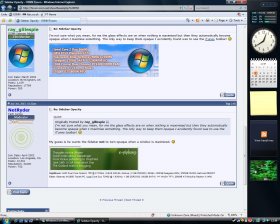
Hi. Does anyone know how to get the sidebar to stay transparent when maximising a window? At the moment, the sidebar will only show it's glass effect if no window is maximised. Once I maximise a window, the sidebar turns black, so too the window's title bar.
 
Last edited:
Well, there's no built-in option to do this, as far as I'm aware.
Maybe Sidebar Styler with a custom skin might help? I haven't tried it myself, so I'm not sure.
 
I'm not sure what you mean, for me the glass effects are on when nothing is maximised but then they automatically become opaque when I maximise something. The only way to keep them opaque I accidently found was to use the iTunes toolbar! 🙂
 
I'm not sure what you mean, for me the glass effects are on when nothing is maximised but then they automatically become opaque when I maximise something. The only way to keep them opaque I accidently found was to use the iTunes toolbar! 🙂
My guess is he wants the Sidebar not to turn opaque when a window is maximized. 🙂
 
My bad, brain probably was working backwards when I started this thread. 😛
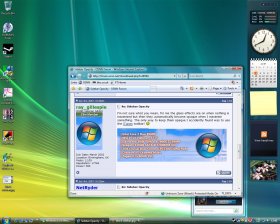
I meant, I'd like the sidebar to be transparent when a window is maximised - like that shown in the 2nd picture.
 

Attachments

  • black sidebar.jpg
    black sidebar.jpg
    206.6 KB · Views: 125
  • see-thru sidebar.jpg
    see-thru sidebar.jpg
    193.5 KB · Views: 117
Ah, that's a good question, to which I don't know the answer unfortunately. Another good question is, why did MS implement this in the first place?

I'll post back if I find anything out.
 

Members online

No members online now.

Forum statistics

Threads
62,021
Messages
673,242
Members
5,639
Latest member
Everlong
Back
Top