Hardware Specification Check, Please!

I shall! The beast is almost up and running - just gotta grab files off the old ide harddrive - get a new wireless card (the linksys one doesn't have a 64 bit driver 🙁) - then try and find out what caused a huge explosion this morning in my old pc 😛
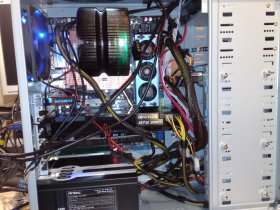
 
After a few hiccups here and there, and finally finding the right bios version. It's working beautifully. Got it lightly overclocked to 3.5 GHz without a single bit of strain on the system, running crysis on full everything got it upto a steady 41 degrees, which isn't bad at all - may try pushing it further for a laugh at some point.

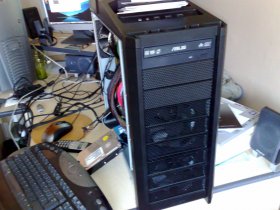
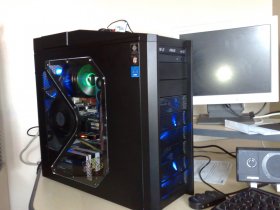
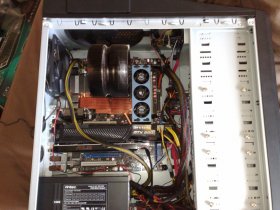
I've got to sort the cables out still - but here's some pictures of it in its infancy.
 

Attachments

  • 28082008045.jpg
    28082008045.jpg
    285.8 KB · Views: 149
  • 28082008047.jpg
    28082008047.jpg
    293.6 KB · Views: 157
  • 29082008052.jpg
    29082008052.jpg
    229.4 KB · Views: 151
Nice, but shame on you for not doing cable management before posting pictures. Sazar will surely ridicule you 😛
 
That's about as tidy as I could get them for now! I'll look at it again sometime soon 😛

(Yeah it still looks horrific)

(Much better with the side panel on to hide it)
 

Attachments

  • 30082008058.jpg
    30082008058.jpg
    153.8 KB · Views: 246
  • 30082008055.jpg
    30082008055.jpg
    234.6 KB · Views: 239
After a few hiccups here and there, and finally finding the right bios version. It's working beautifully. Got it lightly overclocked to 3.5 GHz without a single bit of strain on the system, running crysis on full everything got it upto a steady 41 degrees, which isn't bad at all - may try pushing it further for a laugh at some point.

I've got to sort the cables out still - but here's some pictures of it in its infancy.

Minus that cable management it looks nice. I like your HSF. My Vendetta 2 works nicely but I hate the look.

I'm not sure what BIOS you ended up with but you might be interested in the newest 0408 bios dated 2008.07.10.

Refer here: http://vip.asus.com/forum/view.aspx...&model=Rampage+Formula&page=1&SLanguage=en-us

I've had no ill effects and it apparently it works better with Corsair Dominator DDR2 1066 memory although I've haven't noticed any difference.
 
Yeah, ended up with the 0408, but had to use the EZ Flash 2 method, using the updater didn't make any difference.

The cable management isn't really an important thing for me, as long as it runs and looks alright with the side on 😛 I'm happy!
 
Yeah, ended up with the 0408, but had to use the EZ Flash 2 method, using the updater didn't make any difference.

The cable management isn't really an important thing for me, as long as it runs and looks alright with the side on 😛 I'm happy!

I don't mess around with any other way to update the BIOS. The ASUS EZ Flash 2 is awesome. I just use an older 16 MB SD memory card and a SanDisk MicroMate reader. Pop it into the front USB port, turn on the power, Alt+F2, select the new BIOS from the memory card, and you're good to go. 😀

Your cable management isn't that bad, really, unless someone is being totally nuts about it. You have a lot more free room in your case than I do in mine.
 

Members online

No members online now.

Forum statistics

Threads
62,021
Messages
673,242
Members
5,642
Latest member
osipov
Back
Top