- Joined
- 10 Aug 2007
- Messages
- 253
I searched, really I did! Saw lots of cool tips (thanks Perris) that are beyond my needs right now.
My situation: Start > Programs > a mess
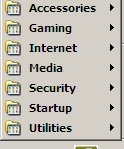
My desire: Start > Programs > logical groupings for applications.
I seem to remember in Win98 being able to create folders for the Programs flyout menu.
It had to do with left-clicking Start, opening the folder, creating other folders, dragging .exe files into it and so on.
I'm reluctant to mess around because when I look at start > programs in the folder view I don't see nested folders and only a few applications.
Help? Advice. TIA
My situation: Start > Programs > a mess
My desire: Start > Programs > logical groupings for applications.
I seem to remember in Win98 being able to create folders for the Programs flyout menu.
It had to do with left-clicking Start, opening the folder, creating other folders, dragging .exe files into it and so on.
I'm reluctant to mess around because when I look at start > programs in the folder view I don't see nested folders and only a few applications.
Help? Advice. TIA