

You are using an out of date browser. It may not display this or other websites correctly.
You should upgrade or use an alternative browser.
You should upgrade or use an alternative browser.
Firefox HD-carbon fiber theme
- Thread starter lynchknot
- Start date


ShepsCrook
Red Sox Fan!
- Joined
- 15 Sep 2003
- Messages
- 1,489
Woohoo. I'm dieing for a better theme, and that looks awesome man.


- Joined
- 2 Dec 2001
- Messages
- 18,694
I'll ignore the fact that last picture has a naughty word in it 
Looks good, shame I am using these light apple-style themes at the moment...
Not used a dark theme for a while now... I am too damn cheery
Looks good, shame I am using these light apple-style themes at the moment...
Not used a dark theme for a while now... I am too damn cheery
lol - sorry - there is a site called "F***theinter.net" - I was checking out
I'll be making at light colored theme from the mac community's GUI mock up contest winner's theme - when/if it becomes available - should be an awesome theme.
You guys think maybe black text on the selected tab would be better?
I'll be making at light colored theme from the mac community's GUI mock up contest winner's theme - when/if it becomes available - should be an awesome theme.
You guys think maybe black text on the selected tab would be better?


Glaanieboy
OSNN Veteran Addict
- Joined
- 6 Mar 2002
- Messages
- 2,628
As far as I know, the Operating System regulates the selected text color and probably the text color itself too. Unless there is a way to override it of courselynchknot said:Sorry, I can't release this until I figure out how to eliminate the hover blue and white text - or someone tells me how.


Glaanieboy
OSNN Veteran Addict
- Joined
- 6 Mar 2002
- Messages
- 2,628
Ok, cool skin, BUT:
If you want, I can post more screenshots.
- The bottom bar (where, among other things, the status of a page is being displayed) shrinks a little when the loading progress bar shows up. It unshrinks when the bar is gone.
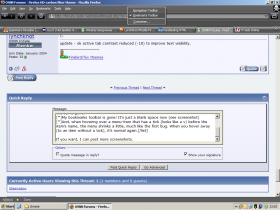
- My bookmarks toolbar is gone! It's just a blank space now (see screenshot)
- And, when hovering over a menu-item that has a tick (looks like a v) before the item's name, the menu shrinks a little, much like the first bug. When you hover away (to an item without a tick), it's normal again.
If you want, I can post more screenshots.
Attachments
Glaanieboy
OSNN Veteran Addict
- Joined
- 6 Mar 2002
- Messages
- 2,628
m0r:
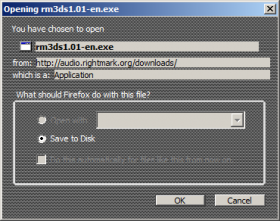
This is the window asking the user where it should save the file. Dunno if that is a WIP, but:
I will post more when I find them, if you don't mind
This is the window asking the user where it should save the file. Dunno if that is a WIP, but:
- The greyed out text should be made lighter (perhaps even a bigger fontsize?), so it is more clear on what it says.
- The first three lines of text (filename, from, mime-type) should have a background-color/image matching the rest of the background. Maybe you could give the text a different color than the rest, so that is stands out better, as these lines give pretty important information.
I will post more when I find them, if you don't mind
Attachments

indyjones
OSNN.net Adventurer
- Joined
- 5 Nov 2002
- Messages
- 1,567
Cant get it to work at all mind you I am using a non official build Mozilla/5.0 (Windows; U; Windows NT 5.1; en-US; rv:1.7b) Gecko/20040326 Firefox/0.8.0+ (scragz)
Still the screen shots look amazing
Any chance of branching into Visual Styles as well? A carbon fiber task bar would be well funky
mind you I am using a non official build Mozilla/5.0 (Windows; U; Windows NT 5.1; en-US; rv:1.7b) Gecko/20040326 Firefox/0.8.0+ (scragz)Still the screen shots look amazing
Any chance of branching into Visual Styles as well? A carbon fiber task bar would be well funky
Affiliates


Latest profile posts


Impressed you have kept this alive this long EP! So many sites have come and gone.
Just did some crude math and I apparently joined almost 18yrs ago, how is that possible???
Just did some crude math and I apparently joined almost 18yrs ago, how is that possible???

Rest in peace my friend, been trying to find you and finally did in the worst way imaginable.