Reply
Old January 21st, 2004 Top | #1
 
12nights's Avatar
OSNN Junior Addict
Joined: January 2004
Posts: 2
Reputation: 0
Power: 0

Default User settings

I am running windows XP on my main system and it does not seem to want to save user settings. I can set a folder to show details, eliminate the details I dont want to see and set arrange icons by name and show in groups. When I reboot the folders have lost those settings.

12nights is offline   Reply With Quote
Old January 21st, 2004 Top | #2

OSNN Folding Team  
Erbmaster's Avatar
OSNN Veteran Addict
Joined: March 2003
Location: Middle Of Nowhere - UK
Posts: 1,195
Reputation: 270
Power: 122

Default

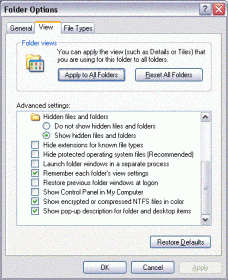
Double-click My Computer, then Tools>>>Folder Options.
Click the view tab then scroll down and look for the setting
"Remember each folder's view setting"
Ensure this is ticked.
Then you should be able to assign different views for each folder, and Windows will remember them.
Attached Thumbnails
User settings-look-here...gif  

The Cake Is A Lie? - Well There'd Better Be Cookies!
Erbmaster is offline   Reply With Quote
Old January 21st, 2004 Top | #3
 
12nights's Avatar
OSNN Junior Addict
Joined: January 2004
Posts: 2
Reputation: 0
Power: 0

Default

That is checked on mine and it still looses folder preferences.
12nights is offline   Reply With Quote

Reply

Bookmarks

Thread Tools

Posting Rules

Similar Threads
Thread Thread Starter Forum Replies Last Post
Transferring user settings... donkey33 Windows Desktop Systems 2 March 16th, 2004 2:27pm
Migrate User Settings i_pedal Windows Desktop Systems 3 August 15th, 2002 2:56am
User Settings--GONE amoebadrew Windows Desktop Systems 1 May 28th, 2002 1:56am
User settings set up on XP Pro. scsa20 Windows Desktop Systems 15 May 26th, 2002 8:34am
copying/using/backing-up user settings.. RaspootiN Windows Desktop Systems 1 January 24th, 2002 6:01pm