|
|
![]() |
|
|
Top | #1 |
|
sh! it stinks
Joined: December 2005
Location: Amsterdam, The Netherlands
Posts: 277
Reputation: 130
Power: 95 |
a couple of days ago I attached two portable disks to my laptop. In windows explorer they showed up as disk L: and U:. Now I cannot remove these references to these disks, so even though the disks are no longer attached to my laptop they still show up in explorer. I tried to find something in the register editor but I did not find anything related to L: or U:. How can I remove these disks in explorer? Thanks! In the attachment: lokale schijf = local disk |
|
|
|
|
|
Top | #2 |
|
OSNN Veteran Addict
Joined: June 2004
Location: Seattle
Posts: 2,899
Reputation: 2689
Power: 164 |
Try looking here: HKEY_LOCAL_MACHINE\SYSTEM\MountedDevices
|
|
|
|
|
|
Top | #3 |
|
sh! it stinks
Joined: December 2005
Location: Amsterdam, The Netherlands
Posts: 277
Reputation: 130
Power: 95 |
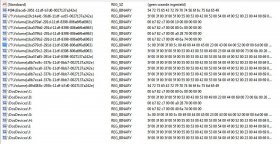
Thanks but I see no L or U disk there.... (also not when opening the regkeys)
|
|
|
|
|
|
Top | #4 |
|
.. Commodore ..
Joined: January 2004
Location: Happy Valley
Posts: 5,021
Reputation: 2369
Power: 188 |
Did you try to reboot your pc? Also, check bios and make sure they aren't still listed there.
|
|
|
|
|
|
Top | #5 |
|
sh! it stinks
Joined: December 2005
Location: Amsterdam, The Netherlands
Posts: 277
Reputation: 130
Power: 95 |
|
|
|
|
|
|
Top | #6 |
|
OSNN Veteran Addict
Joined: June 2004
Location: Seattle
Posts: 2,899
Reputation: 2689
Power: 164 |
They may be one of the ??volumes further up the list.
Right click on the entries and select Modify binary data See if the drive name is there in the data. You can also just delete all the entries as Windows will re-create all devices still connected when you reboot. |
|
|
|
|
|
Top | #7 |
|
sh! it stinks
Joined: December 2005
Location: Amsterdam, The Netherlands
Posts: 277
Reputation: 130
Power: 95 |
Originally Posted by American Zombie
I already looked in the entries but did not find the drivernames there. Will try to delete the entries, see what will happen...
Update: deleted the entries, rebooted, the disks are still there.... |
|
|
|
|
|
Top | #8 |
|
OSNN Veteran Addict
Joined: June 2004
Location: Seattle
Posts: 2,899
Reputation: 2689
Power: 164 |
Might be ghosted devices that are hidden.
Open an command prompt and type the following then push enter: set devmgr_show_nonpresent_devices=1 Now type the following and press enter: devmgmt.msc When device manager opens go to the top and select View > show hidden devices Now look in Disk drives and perhaps USB in device manager for your rogue entries. |
|
|
|
|
|
Top | #9 |
|
sh! it stinks
Joined: December 2005
Location: Amsterdam, The Netherlands
Posts: 277
Reputation: 130
Power: 95 |
Originally Posted by American Zombie
Good tip, hadn't thought of this yet. But .. did it like you said, removed all the items in devicemanager that might point to the two local disks, rebooted ... they are still there....
|
|
|
|
|
|
Top | #10 |
|
Extinction Agenda
Joined: April 2002
Location: New York
Posts: 972
Reputation: 294
Power: 148 |
I would attach them again and then do [Safely remove hardware option] if you haven't tried that.
|
|
|
|
|
|
Top | #11 |
|
- geek -
Joined: September 2003
Location: NY, USA
Posts: 5,262
Reputation: 1730
Power: 188 |
I thought you could just right click on it and remove it (had same issue with network drive once). If not I assume this Vista help page from MS would be the same as 7 is just Vista v2.
Change, add, or remove a drive letter |
|
|
|
|
|
Top | #12 |
|
sh! it stinks
Joined: December 2005
Location: Amsterdam, The Netherlands
Posts: 277
Reputation: 130
Power: 95 |
Tried this, thing is these disk are ext3 formatted to use with Linksys NSLU2. To see these disks in Win7 I had to install a driver. When I reinstalled this driver yesterday I could not assign the driveletters L and U because they are already in use...
|
|
|
|
|
|
Top | #13 |
|
sh! it stinks
Joined: December 2005
Location: Amsterdam, The Netherlands
Posts: 277
Reputation: 130
Power: 95 |
Originally Posted by Xie
Unfortunately these driveletters do not show up in diskmanagement. So I cannot remove them either...
|
|
|
|
|
|
Top | #14 |
|
Extinction Agenda
Joined: April 2002
Location: New York
Posts: 972
Reputation: 294
Power: 148 |
Hmm could they have been setup to reconnect at logon? I'm just throwing something out there until we can figure it out. Right click my computer and select disconnect network drives. If you haven't done this see if that's the problem.
|
|
|
|
|
|
Top | #15 |
|
sh! it stinks
Joined: December 2005
Location: Amsterdam, The Netherlands
Posts: 277
Reputation: 130
Power: 95 |
Tried this too, the disks are no network drives... they are listed as "other" in explorer (my computer)
|
|
|
|
|
|
Top | #16 |
|
Extinction Agenda
Joined: April 2002
Location: New York
Posts: 972
Reputation: 294
Power: 148 |
Use ccleaner to clean your registry. I'm going to see if I can find or figure something out.
|
|
|
|
|
|
Top | #17 |
|
sh! it stinks
Joined: December 2005
Location: Amsterdam, The Netherlands
Posts: 277
Reputation: 130
Power: 95 |
|
|
|
|
|
|
Top | #18 |
|
OSNN Veteran Addict
Joined: June 2004
Location: Seattle
Posts: 2,899
Reputation: 2689
Power: 164 |
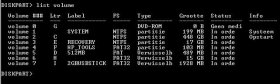
Re-attach the drives then open a command prompt and type diskpart
Wait until you get to the diskpart prompt then type list volume If the drives or drive letters are listed then type select volume followed by the letter you want to select select volume L Once selected type remove letter=L Do the same for the other drive letter you want to remove. |
|
|
|
|
|
Top | #19 |
|
sh! it stinks
Joined: December 2005
Location: Amsterdam, The Netherlands
Posts: 277
Reputation: 130
Power: 95 |
Originally Posted by American Zombie
Thanks for your suggestion. I reconnected the drives, loaded a command prompt, types diskpart and then list volumes .... see attachment for the result....
|
|
|
|
|
|
Top | #20 |
|
OSNN Veteran Addict
Joined: June 2004
Location: Seattle
Posts: 2,899
Reputation: 2689
Power: 164 |
See if those drives are listed in system protection and if protection is turned on for them and/or if they say missing.
If protection is on and/or they are missing turn protection off for the drives and they should then disappear. Another idea is if they are listed in the bcd file somehow. Open a command prompt and type: bcdedit /enum all Copy/paste the result |
|
|
|
![]() |
| Bookmarks |
| Thread Tools | |
|
|
Similar Threads
|
||||
| Thread | Thread Starter | Forum | Replies | Last Post |
| Write speed to "local" network storage | Jesse | Windows Desktop Systems | 0 | September 18th, 2007 8:50pm |
| Outlook Express, "To free up disk space, OE can compact messages..." | Punkrulz | Windows Desktop Systems | 2 | August 28th, 2006 2:52am |
| "Attempt to connect to local computer using the Netspy Trojan horse blocked" | VenomXt | Windows Desktop Systems | 4 | July 15th, 2004 7:00pm |
| How do you remove "favorite" from explorer toolbar? | indyjones | Web Design & Coding | 0 | February 12th, 2004 12:31am |
| hard drive taking forever to "check disk".. | U2Penn | General Hardware | 2 | March 30th, 2003 7:50pm |