|
|
![]() |
|
|
Top | #21 |
|
sh! it stinks
Joined: December 2005
Location: Amsterdam, The Netherlands
Posts: 277
Reputation: 130
Power: 95 |
Originally Posted by American Zombie
How can I see if the drives are in system protection? And they are not listed in the result of bcdedit /enum all....
|
|
|
|
|
|
Top | #22 |
|
OSNN Veteran Addict
Joined: June 2004
Location: Seattle
Posts: 2,899
Reputation: 2689
Power: 164 |
Start > right-click Computer > properties
System protection will be on the left side. |
|
|
|
|
|
Top | #23 |
|
sh! it stinks
Joined: December 2005
Location: Amsterdam, The Netherlands
Posts: 277
Reputation: 130
Power: 95 |
Originally Posted by American Zombie
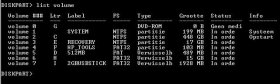
Found it; There are 3 "C disks", one system disk (where I have installed windows) and two other with the comments: (c) "Fail" (lack?) and "enabled"
I cannot remove these last two. See attachment |
|
|
|
|
|
Top | #24 |
|
sh! it stinks
Joined: December 2005
Location: Amsterdam, The Netherlands
Posts: 277
Reputation: 130
Power: 95 |
and when I try to remove the systemprotection for these last two I get this:
An unexpexted failure in the propertiespage has occurred The syntaxis of the filename, mapname of volumename is wrong (0x8007007b) close the propertiespage and try again when I hit cancel, the drives are gone, but then I opened explorer and L and U are still there. Will reboot now, maybe this will fix it... |
|
|
|
|
|
Top | #25 |
|
sh! it stinks
Joined: December 2005
Location: Amsterdam, The Netherlands
Posts: 277
Reputation: 130
Power: 95 |
reboot did not fix the problem...
|
|
|
|
|
|
Top | #26 |
|
OSNN Veteran Addict
Joined: June 2004
Location: Seattle
Posts: 2,899
Reputation: 2689
Power: 164 |
Highlight the entry and then click on the configure button.
On the next screen turn off system protection for that disk then try to delete the entry. |
|
|
|
|
|
Top | #27 |
|
sh! it stinks
Joined: December 2005
Location: Amsterdam, The Netherlands
Posts: 277
Reputation: 130
Power: 95 |
|
|
|
|
|
|
Top | #28 |
|
OSNN Junior Addict
Joined: June 2010
Posts: 5
Reputation: 0
Power: 37 |
I learned things from here. thanks
|
|
|
|
|
|
Top | #29 |
|
sh! it stinks
Joined: December 2005
Location: Amsterdam, The Netherlands
Posts: 277
Reputation: 130
Power: 95 |
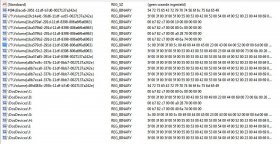
the solution was actually quite simpel
![]() Both disks showed up in the registry in hklm\system\controlset(and controlset001 and controlset002)\control\sessionmanager\dos devices removed both entries, disks are gone! Thanks for all the suggestions anyway! |
|
|
|
|
|
Top | #30 |
|
Extinction Agenda
Joined: April 2002
Location: New York
Posts: 972
Reputation: 294
Power: 148 |
haha I had a feeling it was just a registry issue since the disc were never physically there but I did pick up some tips. Good for you.
|
|
|
|
![]() |
| Bookmarks |
| Thread Tools | |
|
|
Similar Threads
|
||||
| Thread | Thread Starter | Forum | Replies | Last Post |
| Write speed to "local" network storage | Jesse | Windows Desktop Systems | 0 | September 18th, 2007 8:50pm |
| Outlook Express, "To free up disk space, OE can compact messages..." | Punkrulz | Windows Desktop Systems | 2 | August 28th, 2006 2:52am |
| "Attempt to connect to local computer using the Netspy Trojan horse blocked" | VenomXt | Windows Desktop Systems | 4 | July 15th, 2004 7:00pm |
| How do you remove "favorite" from explorer toolbar? | indyjones | Web Design & Coding | 0 | February 12th, 2004 12:31am |
| hard drive taking forever to "check disk".. | U2Penn | General Hardware | 2 | March 30th, 2003 7:50pm |