|
|
![]() |
|
|
Top | #1 |
|
OSNN Designer
Joined: July 2002
Location: Ottawa, Ontario
Posts: 8,722
Blog Entries: 106
Reputation: 1386
Power: 221 |
Of course I am basically a newbie at Linux but part of doing this is because I want to learn it more. My first issue, and it's a big issue because the main thing I do is watch movies and TV shows. And because of where I live I need to use headphones most of the time to not annoy other people. Well my headphones do not work. I found many threads and topics on this but most seem old and are related to laptop issues. I am on a desktop system. I believe its on-board sound, and they are realtek (not sure how its spelt) drivers. Any ideas, how to get it working. Thanks. |
|
|
|
|
|
Top | #2 |
|
OSNN Veteran Addict
Joined: June 2004
Location: Seattle
Posts: 2,864
Reputation: 2689
Power: 151 |
You can download linux drivers at: Realtek
Once there you just need to know if you need HD or ac97 software. |
|
|
|
|
|
Top | #3 |
|
OSNN Designer
Joined: July 2002
Location: Ottawa, Ontario
Posts: 8,722
Blog Entries: 106
Reputation: 1386
Power: 221 |
I have an EVGA 780i SLI mobo, is it realtek? All my system says is MCP55 High Definition Audio
|
|
|
|
|
|
Top | #4 |
|
OSNN Veteran Addict
Joined: January 2003
Location: Fort Worth, TX
Posts: 5,261
Reputation: 3386
Power: 199 |
Looks like the MCP55 is an Nvidia sound chip. Multiple posts on the Ubuntu site about problems. Still looking for solution. brb
Try the find driver option on this page. http://www.nvidia.com/Download/index.aspx?lang=en-us Not looking good for linux support from nvidia. EVGA site had no linux drivers listed either. WTF? I can't beleive nvidia not supporting Ubuntu. I must be missing something. There might be a generic driver in Ubuntu for the Nvidia MCP55 sound. Also, Ubuntu might resist using proprietary drivers. You have to be sure to select use this vile no GPL driver when asked. |
|
|
|
|
|
Top | #5 |
|
- geek -
Joined: September 2003
Location: NY, USA
Posts: 5,224
Reputation: 1730
Power: 175 |
I read a bunch of posts say that it was supported "out of box". I also read a bunch saying it broke when version of Ubuntu was updated (ex. 9.10 -> 10.04). Here is a post that might help I hope ...
Ubuntu Lucid 10.04 – nVidia MCP55 High Definition Audio Problem | Syscalls | com *edit* - I also read one post that said stuff was muted in the "mixer" ... so perhaps check that out also. (System -> Preferences -> Sound) |
|
|
|
|
|
Top | #6 |
|
OSNN Designer
Joined: July 2002
Location: Ottawa, Ontario
Posts: 8,722
Blog Entries: 106
Reputation: 1386
Power: 221 |
Yea did that, did not do anything.
In the Gnome Mixer it shows Realtek ALC1200, so... |
|
|
|
|
|
Top | #7 |
|
- geek -
Joined: September 2003
Location: NY, USA
Posts: 5,224
Reputation: 1730
Power: 175 |
Maybe this will help you: https://help.ubuntu.com/community/SoundTroubleshooting
|
|
|
|
|
|
Top | #8 |
|
OSNN Designer
Joined: July 2002
Location: Ottawa, Ontario
Posts: 8,722
Blog Entries: 106
Reputation: 1386
Power: 221 |
Well I will go over that post but its all about sound, my sound works, just not the headphones.
|
|
|
|
|
|
Top | #9 |
|
- geek -
Joined: September 2003
Location: NY, USA
Posts: 5,224
Reputation: 1730
Power: 175 |
Have you tried booting up Ubuntu with the headphones plugged in? (read this worked in several threads that had headphone issues)
|
|
|
|
|
|
Top | #10 |
|
OSNN Designer
Joined: July 2002
Location: Ottawa, Ontario
Posts: 8,722
Blog Entries: 106
Reputation: 1386
Power: 221 |
Yes I tried that, was how I found out they didn't work. Since then tried booting without them in.
|
|
|
|
|
|
Top | #11 |
|
Godlike!
Joined: February 2004
Location: Salisbury, Wiltshire, UK
Posts: 7,031
Blog Entries: 5
Reputation: 4137
Power: 213 |
are they usb ones? THey should just work if they plug in to your sound card.
|
|
|
|
|
|
Top | #12 |
|
OSNN Designer
Joined: July 2002
Location: Ottawa, Ontario
Posts: 8,722
Blog Entries: 106
Reputation: 1386
Power: 221 |
Hmm, they are plugged into the front of the system, didn't think about that.
|
|
|
|
|
|
Top | #13 |
|
Godlike!
Joined: February 2004
Location: Salisbury, Wiltshire, UK
Posts: 7,031
Blog Entries: 5
Reputation: 4137
Power: 213 |
Let us know what happens when you plug them in directly at the back
Front audio requires driver support to switch audio paths.
|
|
|
|
|
|
Top | #14 |
|
OSNN Designer
Joined: July 2002
Location: Ottawa, Ontario
Posts: 8,722
Blog Entries: 106
Reputation: 1386
Power: 221 |
I haven't had time to try that yet, busy. But I did realize that it wouldn't matter, I want to be able to use my speakers as well and that would replace it.
Will let you know anyways. |
|
|
|
|
|
Top | #15 |
|
Godlike!
Joined: February 2004
Location: Salisbury, Wiltshire, UK
Posts: 7,031
Blog Entries: 5
Reputation: 4137
Power: 213 |
And it'll kill you to swap wires over occasionally?
|
|
|
|
|
|
Top | #16 |
|
OSNN Designer
Joined: July 2002
Location: Ottawa, Ontario
Posts: 8,722
Blog Entries: 106
Reputation: 1386
Power: 221 |
So plugged them in the back and they don't work.
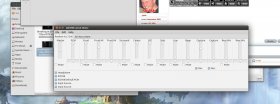
![]() ** Once plugged in the back I started to play with settings, and now it's working. FINALLY! lol Not perfect but will do. Thanks. |
|
|
|
![]() |
| Bookmarks |
| Thread Tools | |
|
|
Similar Threads
|
||||
| Thread | Thread Starter | Forum | Replies | Last Post |
| 10 Best Headphone Deals | osososo | Garage Sale | 1 | March 12th, 2010 1:43am |
| Headphone connection for Wii??? | mlakrid | Console Gaming | 4 | July 14th, 2009 3:39am |
| Kubuntu/Ubuntu test problem | zapoqx | Linux & BSD | 10 | January 14th, 2006 11:54pm |
| need headphone switchbox for 5.1 sys | _kC_ | General Hardware | 5 | February 18th, 2005 8:41am |
| Headphone suggestions???? | Yharn | General Hardware | 3 | March 23rd, 2004 3:30am |