


Complete
OSNN Addict
- Joined
- 25 Aug 2005
- Messages
- 94
How do I get Ubuntu to work with a LexMark x125 printer?
I have recently installed Ubuntu on a system that had previously had Windows XP on it.
This is a summary of the hardware:
Processor: Intel (R) Celeron (TM) CPU 1200 MHz
Memory 243.8 MiB
Available Disk Space 101.6 GiB
Ubuntu has been successfully installed and I am using this OS to type this issue. The Printer I have is connected via a USB port. When I plugged in this printer, Ubuntu recognized it. I have yet to successfully print a Test Page, though.
I have already tried a couple of suggestions I have found after searching online:
Forums.org - Forums Resources and Information.
Forums.org - Forums Resources and Information.
These instructions do not work and some of the suggestions do not make any sense. The Lexmark x125 is connected via a USB port, so why does the instructions suggest to connect as a Network Printer? Also the print driver is a .pdd file and no such file exists in the zipped files that are suggested to be downloaded.
I continued to search and I found a PDD file that I thought might work:
Printer: Lexmark X125 | OpenPrinting - The Linux Foundation
This page contains a link to a PDD file which I downloaded and used in the setup configuration for the printer. But, after doing this, I was still unable to print a test page.
I know that my Ubuntu Operating System recognizes my Lexmark x125 printer. I know this because when I bring up the window, "Printer Properties -'x125' on localhost" there is a line of text that reads "Printer State: Idle" and when I pull the cable that connects the printer to the computer out of the printer, this line of text changes and reads "Printer State: Stopped -Unplugged or turned off". So I know that Ubuntu "sees" my printer. So why cannot I print something?
Please help. Please tell me what more information you need and how to get it.
According to the Lexmark support web site, there are no official drivers for this printer for Ubuntu and I should go back to Windows XP. (I am missing one of the system restore CD's and Sony no longer sells them which is why I am in this current situation.)
http://support.lexmark.com/index?locale=en&segment=DOWNLOAD&startover=y&userlocale=EN_UK&question=what+drivers+are+available+for+x125&productCode=LEXMARK_X125&page=answers&detectedProductFacet=CMS-CATEGORY_REF.LEXMARK.PRODUCTS.ALLINONE.LEXMARK_X125&searchid=1280899505683#1
Does this mean you ar going to let Microsoft win? Does this mean you are going to sit there and allow Linux to be beaten by Microsoft?! http://s67.photobucket.com/albums/h292/Athono/?action=view¤t=Screenshot.pngShows how I can Diagnose the problem.Does this mean anything to you:
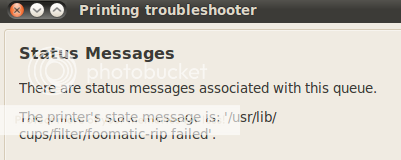 This window mentions the CUPS scheduler that you mention:http://i67.photobucket.com/albums/h292/Athono/Screenshot-2-1.pngAnd, finally, I got this output:http://i67.photobucket.com/albums/h292/Athono/Screenshot-3.pngThis text is too long to post here, but you can see it here:http://www.gelsana.com/troubleshoot.htmlIs there something I should look for?
I have recently installed Ubuntu on a system that had previously had Windows XP on it.
This is a summary of the hardware:
Processor: Intel (R) Celeron (TM) CPU 1200 MHz
Memory 243.8 MiB
Available Disk Space 101.6 GiB
Ubuntu has been successfully installed and I am using this OS to type this issue. The Printer I have is connected via a USB port. When I plugged in this printer, Ubuntu recognized it. I have yet to successfully print a Test Page, though.
I have already tried a couple of suggestions I have found after searching online:
Forums.org - Forums Resources and Information.
Forums.org - Forums Resources and Information.
These instructions do not work and some of the suggestions do not make any sense. The Lexmark x125 is connected via a USB port, so why does the instructions suggest to connect as a Network Printer? Also the print driver is a .pdd file and no such file exists in the zipped files that are suggested to be downloaded.
I continued to search and I found a PDD file that I thought might work:
Printer: Lexmark X125 | OpenPrinting - The Linux Foundation
This page contains a link to a PDD file which I downloaded and used in the setup configuration for the printer. But, after doing this, I was still unable to print a test page.
I know that my Ubuntu Operating System recognizes my Lexmark x125 printer. I know this because when I bring up the window, "Printer Properties -'x125' on localhost" there is a line of text that reads "Printer State: Idle" and when I pull the cable that connects the printer to the computer out of the printer, this line of text changes and reads "Printer State: Stopped -Unplugged or turned off". So I know that Ubuntu "sees" my printer. So why cannot I print something?
Please help. Please tell me what more information you need and how to get it.
According to the Lexmark support web site, there are no official drivers for this printer for Ubuntu and I should go back to Windows XP. (I am missing one of the system restore CD's and Sony no longer sells them which is why I am in this current situation.)
http://support.lexmark.com/index?locale=en&segment=DOWNLOAD&startover=y&userlocale=EN_UK&question=what+drivers+are+available+for+x125&productCode=LEXMARK_X125&page=answers&detectedProductFacet=CMS-CATEGORY_REF.LEXMARK.PRODUCTS.ALLINONE.LEXMARK_X125&searchid=1280899505683#1
Does this mean you ar going to let Microsoft win? Does this mean you are going to sit there and allow Linux to be beaten by Microsoft?! http://s67.photobucket.com/albums/h292/Athono/?action=view¤t=Screenshot.pngShows how I can Diagnose the problem.Does this mean anything to you:


