|
|
![]() |
|
|
Top | #1 |
|
w3lc0m3 t0 7h3 r3al w0r1d
Joined: August 2006
Location: nyc
Posts: 62
Reputation: 0
Power: 71 |
now when i startup the computer nothing comes up on the moniter and there are no beeps. hopefully some 1 canhelp im stuck thx |
|
|
|
|
|
Top | #2 |
|
OSNN Veteran Addict
Joined: January 2002
Location: Brossard,Quebec
Posts: 4,199
Blog Entries: 1
Reputation: 1481
Power: 182 |
Well if there are no beeps and it wont boot it looks like the card is either no good or not the right card for your board
Looking on google I see the video card is a newer AGP and the motherboard is the old AGP it wont work you need an older AGP card |
|
|
|
|
|
Top | #3 |
|
Beware the G-Man
Joined: March 2002
Location: XP-erience, NTFS, OSNN, Bay Area, California
Posts: 18,474
Reputation: 4070
Power: 348 |
The AGP slot is a 1X/2X/4X slot on the MoBo. The Card is a 8X AGP, but they are supposed to be backward compatible. The card should work, it would just run in 4X mode. What type of video card were you using before? Also make sure that the card is seated correctly and that the Monitor is plugged into the video card correctly. Pull the card out and reinstall it, then reboot and see if it works. Also is this crad used, did it come out of a working system?
Now one thing that could be causing the problem is if in the BIOS there is a setting to switch between 2X and 4X. If this is the case then you have to reinstall your old card go into the BIOS and set the AGP bus speed to 4X. Then shut down and pull the old card and reinsert the FX5200 and reboot. Now if anyone knows a bit more on this board and it's BIOS they may be able to help more. |
|
|
|
|
|
Top | #4 |
|
Beware the G-Man
Joined: March 2002
Location: XP-erience, NTFS, OSNN, Bay Area, California
Posts: 18,474
Reputation: 4070
Power: 348 |
Here, found the BIOS PDF for this board.
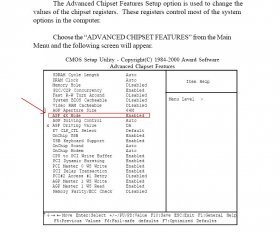
This is in the Advanced Chipset Features section. You do have to set the AGP to 4X. So you will have to reinstall your old Video Card, go into the BIOS and set the AGP to 4X. Good Luck. ![]() Link to PDF: http://www.fujitsu-siemens.co.uk/rl/...%20settings%22 (go to Section 3.6) |
|
|
|
|
|
Top | #5 |
|
w3lc0m3 t0 7h3 r3al w0r1d
Joined: August 2006
Location: nyc
Posts: 62
Reputation: 0
Power: 71 |
the video card works fine as i tested in a different computer note: that one of the card is a PCI vidoe card also the AGP card i have is an old one pulled from am asus system.
|
|
|
|
|
|
Top | #6 |
|
Beware the G-Man
Joined: March 2002
Location: XP-erience, NTFS, OSNN, Bay Area, California
Posts: 18,474
Reputation: 4070
Power: 348 |
Which video card is a PCI card? The FX5200 or the one that you originally had in your system?
[edit] Wait wait wait, are you saying that your system had a PCI video card in it before you tried to install the FX5200? |
|
|
|
|
|
Top | #7 |
|
Red Sox Fan!
Joined: September 2003
Location: Raleigh NC
Posts: 1,484
Reputation: 590
Power: 125 |
I was about to say, did anyone check to see if he's trying to put an AGP card in, or a PCI card? And what slots that board has?
|
|
|
|
|
|
Top | #8 |
|
Beware the G-Man
Joined: March 2002
Location: XP-erience, NTFS, OSNN, Bay Area, California
Posts: 18,474
Reputation: 4070
Power: 348 |
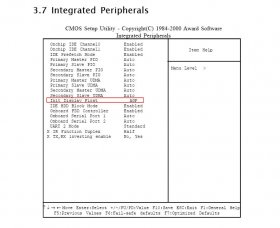
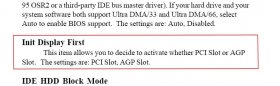
There is another setting in the "Integrated Peripherals" section that you should set also. It's for setting which type of Video Card is used, be it PCI or AGP. in Section 3.7 of the PDF.
|
|
|
|
|
|
Top | #9 |
|
Beware the G-Man
Joined: March 2002
Location: XP-erience, NTFS, OSNN, Bay Area, California
Posts: 18,474
Reputation: 4070
Power: 348 |
It can use either one. Due to it's age it could use the old PCI cards or the then newer AGP cards. But you have to go into the BIOS and set everything in order to use an AGP card. It can not use the new PCI Express cards. The FX5200 was an AGP only card from what I remember. Actually they come in PCI-e also from what I found through Google.
|
|
|
|
|
|
Top | #10 |
|
Debiant by way of Ubuntu
Joined: August 2002
Location: London, UK
Posts: 3,763
Blog Entries: 5
Reputation: 1390
Power: 169 |
I had a 5200 once - it was AGP.... doubt if that is helpful - I did not have it for long, soon offloaded for an ATI 9800 I think....
|
|
|
|
|
|
Top | #11 |
|
w3lc0m3 t0 7h3 r3al w0r1d
Joined: August 2006
Location: nyc
Posts: 62
Reputation: 0
Power: 71 |
its the FX5200 okay i dont think you understood prbly i didnt explain clearly enough ,the Motherboard it self has no onboard video . so what i wanted to do is install a video card that will give me minimal setting so i can get to the os and install the driver , but heres the catch the computer itself has no os on it. so i not only i get nothing but i have no os.
edit: apologies its a 5800 Series and note the card is is brandnew condition hardly used. not a system pull. |
|
|
|
|
|
Top | #12 |
|
OSNN Veteran Addict
Joined: January 2003
Location: Fort Worth, TX
Posts: 5,261
Reputation: 3386
Power: 199 |
You should be able to boot with just the MB, CPU, keyboard, video card and RAM and see the POST (power on self test) bios setup screens. You don't need drivers, HD, CD/DVD, operating system, etc.
If you can not boot to POST then something is assembled wrong or with an older video card you may have fogotten to plug in the second pwoer plug from the power supply to the video card. These require an adapter that is provided with the video card. Most 5800 cards did require the extra power connector. Newer model cards will still boot and pop up a screen that says you forgot to connect the power cable. Old cards just sat there with a blank screen. Make sure you plug the adapter in the right direction If the video requires and has a second power cable check how the MB is installed. Make sure the screw heads are centered in the MB holes otherwise the MB can short to the case and it won't boot. Also make sure the video card is fully seated in its slot. Sometimes you have to bend the rear panel plate to make it fit right. CHeck list in the order they should occur: Do the power supply and CPU fans spin? -- No, PSU or MB shorted to case Do the keyboard light flash? -- No, dead CPU or MB Do any beeps occur? -- No, MB or CPU, older vid card power plug missing Does POST screen appear? -- No, vid card power, monitor, or vid card. |

|
|
|
|
|
Top | #13 |
|
w3lc0m3 t0 7h3 r3al w0r1d
Joined: August 2006
Location: nyc
Posts: 62
Reputation: 0
Power: 71 |
[/quote]CHeck list in the order they should occur:
Do the power supply and CPU fans spin? -- No, PSU or MB shorted to case Do the keyboard light flash? -- No, dead CPU or MB Do any beeps occur? -- No, MB or CPU, older vid card power plug missing Does POST screen appear? -- No, vid card power, monitor, or vid card.[/QUOTE] YEs Power supply and CPu fan spin yes keyboard lights flash no beeps occur no video. the FS5800 doesnt require an extra power , therefore it should be fine. I dunno what else would be wrong. heres a website for my card. http://reviews.cnet.com/APOLLO_nVIDI...-30870622.html |
|
|
|
|
|
Top | #14 |
|
Beware the G-Man
Joined: March 2002
Location: XP-erience, NTFS, OSNN, Bay Area, California
Posts: 18,474
Reputation: 4070
Power: 348 |
Well this may sound dumb, but is the Monitor plugged into the video card and plugged into the wall plug and turned on?
But again If the settings in your BIOS I posted before are not set it won't matter how many things are checked you won't get anything at the Monitor. Put the old Video Card back into the box and see if it goes to POST. If so then enter the BIOS Setup and set the settings I specified. Turn off the Machine, remove old card install new card and turn it back on. Now that I think about all your posts and decipher them (I think I have), you are going to need an old PCI Video Card to get it to post and set the BIOS. These Boards were usually set to the PCI type of Video Card by default back then. You usually would have to go into the BIOS and set it for AGP for the Board to see the AGP card. These old Mother Boards when they gave a choice of the old PCI or the then new AGP they were set to PCI from the Manufacturer. You would have to change the BIOS settings in order to upgrade to AGP. That's because back then all Video Cards were PCI. |
|
|
|
|
|
Top | #15 |
|
Debiant by way of Ubuntu
Joined: August 2002
Location: London, UK
Posts: 3,763
Blog Entries: 5
Reputation: 1390
Power: 169 |
yeah, hold that del key is what I say... and yeah - I was being exceptionally lazy in my typing, it was the FX5200 I had, was just letting the guys know that is an AGP card (which seems to have helped)... If you need a PCI vid card it just hapens I have an old one laying about BTW (it truly is ancient though and may not have enough RAM to do anything useful!)
|
|
|
|
![]() |
| Bookmarks |
| Thread Tools | |
|
|
Similar Threads
|
||||
| Thread | Thread Starter | Forum | Replies | Last Post |
| Add shared system mem to video card? | failurbydesign | Graphics Cards | 8 | February 21st, 2007 5:19pm |
| Windows 2000 and installing a new video card | Punkrulz | Windows Desktop Systems | 3 | May 29th, 2005 4:47am |
| Possible Onboard Video Problem | Kaila Yu | General Hardware | 5 | August 10th, 2002 8:54pm |
| Problem with onboard video and new card. | powdertoastman | Graphics Cards | 1 | July 19th, 2002 12:49pm |
| A new system or just Video Card Upgrade? | Cannibal Corpse | Graphics Cards | 15 | July 6th, 2002 3:45pm |