|
|
![]() |
|
|
Top | #1 |
|
OSNN Junior Addict
Joined: May 2006
Posts: 8
Reputation: 0
Power: 74 |
|
|
|
|
|
|
Top | #2 |
|
█▄█ ▀█▄ █
Joined: April 2005
Location: Massachusetts
Posts: 16,949
Reputation: 4941
Power: 305 |
Speaker might be blown. Also could check in the Control Panel to ensure your speaker balancing isn't set all the way over to the left.
|
|
|
|
|
|
Top | #3 |
|
OSNN Junior Addict
Joined: May 2006
Posts: 8
Reputation: 0
Power: 74 |
where can I look in the control panel to check...???????????????
|
|
|
|
|
|
Top | #4 |
|
OSNN Junior Addict
Joined: May 2006
Posts: 8
Reputation: 0
Power: 74 |
where can I check in control panel to make the other speaker of my laptop work...it doesnt look like it has blown up....what do I need to do..I need the steps...
|
|
|
|
|
|
Top | #5 |
|
Michaelsoft Systems CEO
Joined: February 2003
Location: Hamilton, Ontario Canada Earth
Posts: 3,125
Blog Entries: 8
Reputation: 2216
Power: 166 |
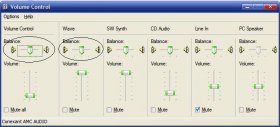
Control>Sound and Audio Devices>Advanced or Double Click the speaker icon in the system tray.
Now make sure the balance is in the middle for Volume Control and Wave. However if you were previously using the headphone jack to connect to a stereo setup and there were no problems then I'm afraid that kcnychief is probably right in that your speaker may have blown. |
|
|
|
|
|
Top | #6 |
|
Michaelsoft Systems CEO
Joined: February 2003
Location: Hamilton, Ontario Canada Earth
Posts: 3,125
Blog Entries: 8
Reputation: 2216
Power: 166 |
Only start one thread please. You have already started a thread on this issue. Multiple threads won't get you help any faster.
Thank You. |
|
|
|
|
|
Top | #7 |
|
█▄█ ▀█▄ █
Joined: April 2005
Location: Massachusetts
Posts: 16,949
Reputation: 4941
Power: 305 |
Threads Merged
|
|
|
|
|
|
Top | #8 |
|
OSNN Junior Addict
Joined: May 2006
Posts: 8
Reputation: 0
Power: 74 |
yeah..
I used headphones before... |
|
|
|
|
|
Top | #9 |
|
Michaelsoft Systems CEO
Joined: February 2003
Location: Hamilton, Ontario Canada Earth
Posts: 3,125
Blog Entries: 8
Reputation: 2216
Power: 166 |
I can only think of three things that could cause this and one was the balance. The other two are a blown speaker (you haven't mentioned the balance result) or possibly the headphone jack.
When you plug in the headphone jack it kills the connection to the speakers, what I'm thinking is something went amiss and the right speaker isn't getting reconnected. |
|
|
|
|
|
Top | #10 |
|
Red Sox Fan!
Joined: September 2003
Location: Raleigh NC
Posts: 1,484
Reputation: 590
Power: 125 |
Reinstall your audio drivers so that you can rule out software at least. I always try to reduce the amount of possibilities starting with the easiest ones.
|
|
|
|
![]() |
| Bookmarks |
| Thread Tools | |
|
|
Similar Threads
|
||||
| Thread | Thread Starter | Forum | Replies | Last Post |
| Need help! 2 PC LAN - Desktop sees laptop, laptop doesn't see desktop. | CelicaMan94 | Windows Desktop Systems | 6 | June 10th, 2008 3:23am |
| laptop? | AcftMecH | Linux & BSD | 3 | March 7th, 2006 3:57pm |
| New Laptop | Ferral_Imp | Portable Devices & Gadgets | 56 | April 24th, 2005 4:07pm |
| My new laptop =) | NetRyder | General Hardware | 23 | June 22nd, 2003 2:58am |
| Best Laptop? | BenQuilter | Portable Devices & Gadgets | 2 | August 30th, 2002 9:48pm |