|
|
![]() |
|
|
Top | #1 |
|
Who's Yo' Doctor?
Joined: January 2004
Posts: 42
Reputation: 40
Power: 99 |
Which is better? which has stronger reception? Any help is very gladly appreciated... DK |
|
|
|
|
|
Top | #2 |
|
OSNN Addict
Joined: October 2004
Posts: 166
Reputation: 110
Power: 92 |
Personally I perfer USB type adapters such as the Linksys WUSB54G http://www.linksys.com/servlet/Satel...VisitorWrapper
I like these because they use a cable, so you can position them for best signal and they have a high gain anntanne so you get better signal. 2 things though, 1 you have to make sure you have USB 2.0, you can use them with 1.0 and 1.1 but I've found that they don't work anywhere near as well. If you don't have USB 2.0 I would suggest a PCI card. 2. These adapters draw power from the USB port, that shouldn't be an issue for desktops (it wasn't for me) but you might want to use a powered USB Hub, and I have found that laptops don't provide as much power through USB as Desktops, so if you use it on a laptop you might have issues. All I can say in the end is that I have noticed a serious increase in speed and connection strength after switching from a PCI Card Wireless Adapter to a USB Adapter. But that is just my experience. James |
|
|
|
|
|
Top | #3 |
|
█▄█ ▀█▄ █
Joined: April 2005
Location: Massachusetts
Posts: 16,949
Reputation: 4941
Power: 302 |
I would like to campaign for the other side, as I have had better luck with PCI cards. Between the two devices from my experience, I think the more important factor to consider is interference. This includes, but is not limited to, 2.4Ghz wireless phones, some microwaves, old insulation, cement, etc.
|
|
|
|
|
|
Top | #4 |
|
OSNN Senior Addict
Joined: December 2002
Location: New Jersey
Posts: 313
Reputation: 440
Power: 119 |
Originally Posted by jpom
I bought one of these when I had to move my wife's computer to another part of the house. Easy to install and works pretty good. I haven't tried a PCI card though.
|
|
|
|
|
|
Top | #5 |
|
Caffeine-->Code Converter
Joined: April 2002
Location: Montreal, Canada
Posts: 502
Reputation: 60
Power: 125 |
Yeah, I've only used usb adapters and pcmcia...The usb adapter I have in my room (Dell Truemobile 1180, uses a prism2 chipset) isn't that bad. I really like the fact that you can position it to your liking, but on the other hand, you can always switch the antenna on a PCI adapter for a full positionable one as well
|
|
|
|
|
|
Top | #6 |
|
OSNN Senior Addict
Joined: February 2005
Posts: 311
Reputation: 50
Power: 89 |
isn't the pci acutally faster and more stable?
|
|
|
|
|
|
Top | #7 |
|
OSNN Veteran Addict
Joined: January 2003
Location: Fort Worth, TX
Posts: 5,255
Reputation: 3386
Power: 196 |
I've played around with both and everybody who posted above is right. Even though they disagree...
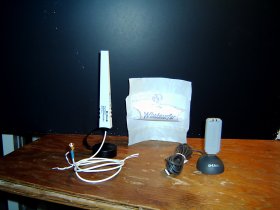
Pros and Cons: The PCI card is handicapped because the antenna sticks out the back which is usually shoved up against a wall blocking the wireless signal. The antenna swivel mount does allow orientation in different directions though which lets you position it for optimum signal reception. You have to dedicate a PCI slot for this one function which is a problem with slot limited microATX MBs. PCI cards readily support windsurfer antennas. The USB dongle has a smaller antenna so it is handicapped on signal strength also. You can move the dongle hub cable around to getthe best reception but you are always horizontally polarized (no swivel bracket) so if you are going from the first floor to the second floor of a house you will loose signal strength. There may also be issues with the usable share of bandwidth on your USB ports compared with a dedicated PCI card. I have not tried a windsurfer on my Dlink dongle. The geometry is wrong and the antenna too short, so I haven't made the effort. Final Solution: If you have a slot free use PCI card with an external gain boosting antenna. This configuration allows you to still add a windsurfer though the improvement may be marginal since the add on antenna is already directional to acheive the gain boost. |
|
|
|
|
|
Top | #8 |
|
Michaelsoft Systems CEO
Joined: February 2003
Location: Hamilton, Ontario Canada Earth
Posts: 3,125
Blog Entries: 8
Reputation: 2216
Power: 163 |
I like a PCI approach with an separate antenna (like in the pic LeeJend posted). I'd rather have the antenna moveable then the whole unit. But that's me.
|
|
|
|
|
|
Top | #9 |
|
The Analog Kid
Joined: March 2002
Location: Red Sox Nation
Posts: 4,638
Reputation: 1111
Power: 178 |
PCI all the way. I had nothing but problems with USB.
As is often said about cable modems, "USB is not for networking." |
|
|
|
|
|
Top | #10 |
|
Michaelsoft Systems CEO
Joined: February 2003
Location: Hamilton, Ontario Canada Earth
Posts: 3,125
Blog Entries: 8
Reputation: 2216
Power: 163 |
Originally Posted by dreamliner77
LOL thats how I feel bout the USB NICs!
|
|
|
|
|
|
Top | #11 |
|
OSNN Junior Addict
Joined: December 2005
Posts: 10
Reputation: 0
Power: 76 |
USB is definately not for networking, but it happens that windows XP has native support for firewire networking, now all we need are some wireless dongles for firewire and we would be set. I really want to see more firewire being used, I have all these ports on my computer for firewire, but everything from cameras to cell phones i have are USB.
|
|
|
|
|
|
Top | #12 |
|
Who's Yo' Doctor?
Joined: January 2004
Posts: 42
Reputation: 40
Power: 99 |
So I just got a Netgear WG311v3 for x-mas. Tried searching for some reviews online, but not many are out there.
What is out there are lots of disgruntled people that have had lots of problems with this one. Anyone here have any experience with this adapter? Or any PCI adapters that they can recommend? DK |
|
|
|
|
|
Top | #13 |
|
OSNN Veteran Addict
Joined: January 2003
Location: Fort Worth, TX
Posts: 5,255
Reputation: 3386
Power: 196 |
PCI wirelaess cards are so cheap they are pretty much throw aways. The only problems I've seen with throw away wifi is the signal range may be less than desired.
Try it in your location and see how it works. Turn on cellphones, microwaves, washing machines that will be in or near the signal path to see if they degrade range. The other annoyance may be if they require special install software instead of the default Windows wifi drivers. This is only an annoyance. Not really a performance issue. PS You are running Windows right? There are a mess of "linux driver" posts on that card. |
|
|
|
|
|
Top | #14 |
|
OSNN Junior Addict
Joined: December 2005
Location: Connecticut
Posts: 35
Reputation: 0
Power: 75 |
I have always used a PCI card and had no problems with it until we put up a new wall in my house. The wiring must have bounced the signal or something, so I went out and bought a lynksys USB adapter. With a longer cable I was able to place the antenna where it would get a strong signal.
USB all the way!! |
|
|
|
![]() |
| Bookmarks |
| Thread Tools | |
|
|
Similar Threads
|
||||
| Thread | Thread Starter | Forum | Replies | Last Post |
| Wireless adapter won't stay connected | pvl_ru | Windows Desktop Systems | 20 | January 24th, 2008 10:10am |
| Wireless Router & USB Adapter | ming | General Hardware | 6 | April 28th, 2007 7:12pm |
| wireless adapter | randmdavis | General Hardware | 2 | January 14th, 2007 4:18pm |
| LinkSys Wireless G Router and Wireless PCI Adapter | retread | Windows Desktop Systems | 4 | January 12th, 2005 9:56pm |
| NETGEAR wireless router and USB adapter | sunniechan | Windows Desktop Systems | 1 | October 24th, 2003 9:16pm |