|
|
![]() |
|
|
Top | #1 |
|
OSNN.net Adventurer
Joined: November 2002
Location: England
Posts: 1,567
Reputation: 330
Power: 131 |
![]() Cheers IJ |
|
|
|
|
|
Top | #2 |
|
Bow Down to the King
Joined: April 2002
Location: New York
Posts: 13,312
Reputation: 4090
Power: 294 |
I don't have Active Sync installed so I am not sure which executable or DLL file the icon is stored in. However, you could use a program like Resource Hacker to edit that exectuable or DLL file and change the icon by replacing the resource.
|
|
|
|
|
|
Top | #3 |
|
OSNN.net Adventurer
Joined: November 2002
Location: England
Posts: 1,567
Reputation: 330
Power: 131 |
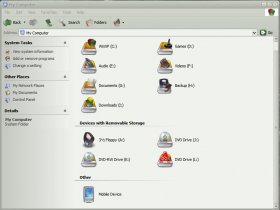
Hi madmatt, i tried changing all the icons I could find in the dll files (none in the exe) via reshacker, and it did not seem to do anything but I guess I forgot to refresh my Icons...... Doh!
Thanks anyway tiz sorted now
|
|
|
|
|
|
Top | #4 |
|
Michaelsoft Systems CEO
Joined: February 2003
Location: Hamilton, Ontario Canada Earth
Posts: 3,125
Blog Entries: 8
Reputation: 2216
Power: 163 |
Nice Icons!
|
|
|
|
|
|
Top | #5 |
|
OSNN.net Adventurer
Joined: November 2002
Location: England
Posts: 1,567
Reputation: 330
Power: 131 |
Cheers they are the Umicons set with my own special twist
hence the 256 colour mobile device icon was scabby so changed it to an image of my IPAQ
|
|
|
|
|
|
Top | #6 |
|
Bow Down to the King
Joined: April 2002
Location: New York
Posts: 13,312
Reputation: 4090
Power: 294 |
Very nice work.
|
|
|
|
|
|
Top | #7 |
|
OSNN.net Adventurer
Joined: November 2002
Location: England
Posts: 1,567
Reputation: 330
Power: 131 |
Doh just noticed that when I reboot the old icon comes back, yet if I refresh the icons (using tweak ui) my new one comes back, oh well windows weirdness i guess
![]()
Originally Posted by madmatt
- Thank you
still the main credit goes to manhatten fantastic icon set, shame he stopped them to go over to gant
|
|
|
|
![]() |
| Bookmarks |
| Thread Tools | |
|
|
Similar Threads
|
||||
| Thread | Thread Starter | Forum | Replies | Last Post |
| Strange lost "My Computer" icon | Brianm996 | Windows Desktop Systems | 1 | January 18th, 2005 5:29pm |
| "Device/Harddisk1/DR2" - the bane of my exsistance | Andy | Windows Desktop Systems | 9 | July 21st, 2004 8:45pm |
| Changing The Default "e" Icon in Favorites | NotBold_Fortune | Windows Desktop Systems | 15 | November 17th, 2003 12:14am |
| "Device needed to boot system" errors | JeremyT | Windows Desktop Systems | 5 | April 26th, 2002 12:19am |
| Removing "Files Stored on This Computer" panel from "My Computer" | OhmEye | Windows Desktop Systems | 2 | April 1st, 2002 12:31am |